
AnyVid APK v4.4.0 Download for Android
If you need to download videos from online platforms and social networks, you can try AnyVid APK. Download this app on website!
App Information
- Updated On
- April 18, 2025
- Package Name
- com.amonyshare.anyvid
- Category
- Photos & Videos
- Version
- 4.4.0
- Size
- 55 MB
- MOD Feature
- Not available
- Requires
- Android
- Price
- Free
- Content Rating
- Everyone
- Internet Required
- Required
Screenshots
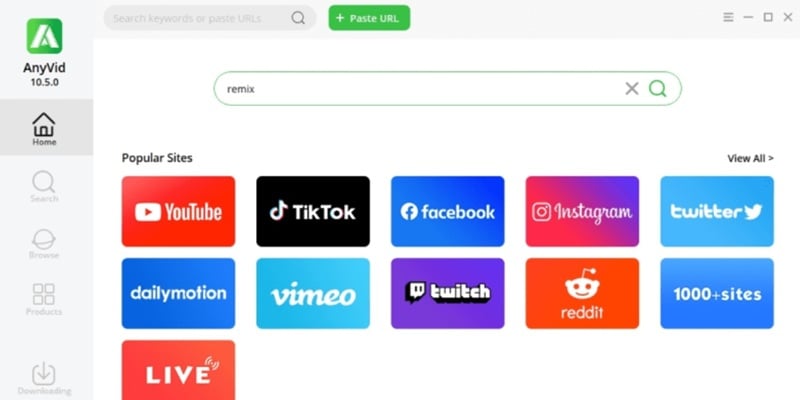
In this world, there are two types of people: those who watch a video and forget about it, and those who, when they find something good, save it to rewatch, extract, remix with music, or simply keep. If you’re in the second group, then AnyVid is an indispensable tool in your digital toolkit. No fluff, no fuss, no need for advanced IT skills. This app was born to download videos, fast, clean, and without missing a single frame. The kind of tool that just needs a copied link to know what to do. No questions, no complaints. A reliable tool, like a screwdriver in an electrician’s bag.
Introduce about AnyVid
AnyVid is a versatile video downloader developed by AmoyShare, allowing you to download videos from over 1,000 websites like YouTube, Facebook, Instagram, TikTok, Vimeo, Dailymotion, Reddit, and many other platforms. The app supports downloading videos in various resolutions, from 240p to 4K, and can convert videos to popular formats like MP4, MP3, AVI, MKV, making it easy to store and watch on multiple devices.
Format conversion tool
One of AnyVid’s smoothest moves is its ultra-seamless file format conversion. After downloading a video, you can convert it to various formats, from MP4, MKV, FLV to audio formats like MP3, M4A. Especially great for content creators or those storing study materials.
No need to juggle a bunch of annoying apps. With super simple operations, your file can go from video to audio, or from high resolution to a lighter version for sharing on TikTok without distortion.
The app processes quickly, outputs files without errors, no audio loss, no distorted visuals. It even lets you tweak bitrate and output quality. For editors or content creators who haven’t discovered this yet, it’s honestly a huge miss.
Supports over 1,000 websites
When it comes to the number of supported sites, AnyVid is unbeatable. Downloading from over 1,000 websites is no big deal. From YouTube, Facebook, TikTok, Instagram to niche platforms like Vimeo, Dailymotion, Reddit. Even sites that often block downloads like TikTok or Twitter, this app handles them like a breeze. Educational resource hubs like TED, Coursera, you name it, AnyVid can grab them all. No joke, as long as you have a link, AnyVid takes care of the rest.
The best part? No complicated copy-paste nonsense. Just hit download, and the app auto-detects and processes. You barely need to think; everything’s streamlined from the start.
Download entire playlists
I bet a lot of you have been waiting for me to mention this part. Downloading entire playlists is a godsend for those learning languages through videos, binging Lo-Fi music, or catching up on YouTube podcasts. Just paste the playlist link, and the app automatically pulls every video. From 5 videos to 150, it handles them all.
You can also be picky, choosing to download only specific videos in the playlist if you don’t want the whole batch. The interface is clear, listing each video for you to check off what you want. No shady tactics forcing you to download everything like some less humane apps.
Plus, download speeds stay solid, and you can pick the quality for each video in the list. Super practical for anyone looking to save storage while keeping the content they need.
Convert video to audio
For busy folks, there are probably plenty of reaction videos, talk shows, or livestreams packed with useful info that you don’t have time to watch, only listen to. No problem, AnyVid’s got you covered! With a few taps, select “MP3 audio,” wait a few seconds, and you’ve got a chill audio file ready for your earbuds.
No need for extra apps or clunky format converters. This app handles it all from A to Z. And crucially, the audio quality doesn’t crack or distort like some other apps. If you record lectures or save podcasts for morning jogs, this feature was made for you.
AnyVid’s interface is stunning!
Gotta be honest: AnyVid’s UI/UX is just gorgeous. No over-the-top colors, no spammy ads, no trick buttons to misclick. From fonts to buttons to layout, everything’s clear and intuitive. Download video, pick format, choose quality, three steps, done. If you’re allergic to apps with cluttered, confusing interfaces, AnyVid is a breath of fresh air, simple yet high-quality.
The minimalist but effective interface, with function buttons placed just right, keeps things on point. You won’t spend all day hunting for the “download” button. Here, everything’s as clear as the back of your hand.
Download AnyVid APK for Android
If you’re a content creator, teacher, student, or just someone who loves watching online videos, AnyVid deserves a spot on your “must-have” list. No need for a tech degree to use it, no annoying ads to drive you nuts, and above all, it makes downloading videos from social media platforms a breeze.
Staff Editor
Reviewed and curated by our editorial team
Download this App
Get the latest version of this application for your Android device.