
iHour APK v7.5.1 Download for Android
But it’s not just a basic stopwatch or to-do list, iHour APK creates a personal space for you to “grow” your skills daily, like watering a plant bit by bit.
App Information
- Updated On
- June 10, 2025
- Google Play ID
- com.clover.ihour
- Category
- Productivity
- Version
- 7.5.1
- Size
- 99 MB
- MOD Feature
- Not available
- Requires
- Android 5.0
- Price
- Free
- Content Rating
- Everyone
- Internet Required
- Unknow
Screenshots
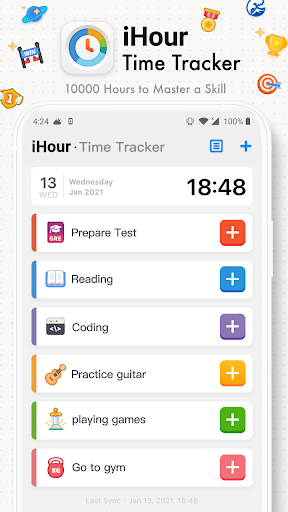
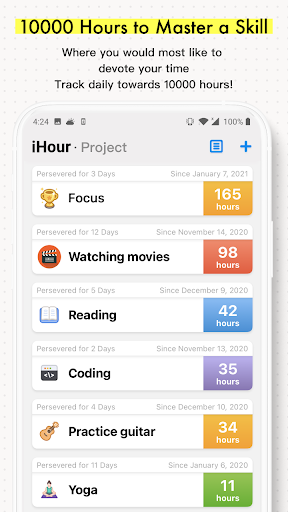
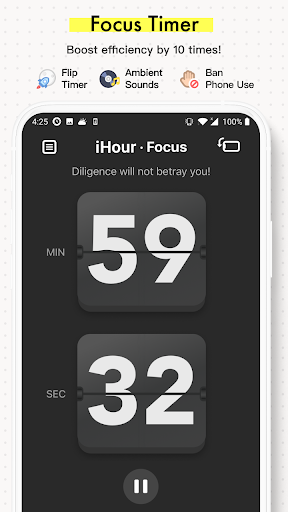
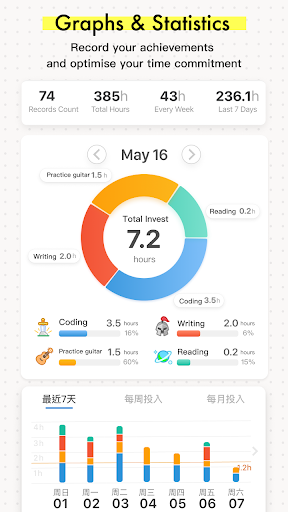
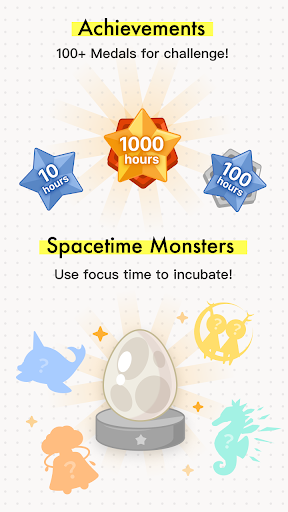
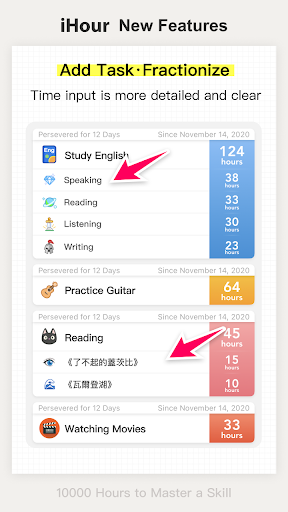
iHour is an app that helps you track the time you spend practicing skills. But it’s not just a basic stopwatch or to-do list; iHour creates a personal space for you to grow your skills daily, like watering a plant bit by bit. From piano, drawing, learning a language, reading books, to even training yourself to focus, everything can be logged in the app. You simply name the skill, pick an icon color (there are nearly 40 colors and icons to mix and match as you like), and start your journey.
Introduce about iHour
10000 Hours to master a skill
The idea of “10,000 hours to become an expert wasn’t invented by iHour. It comes from a theory popularized by Malcolm Gladwell in his book Outliers, stating that to master a skill at an elite level, you need about 10,000 hours of deliberate practice. iHour borrows this concept, not to stress you out, but to provide a clear framework for the skill journey you’re pursuing.
When you create a new skill in the app, a progress bar appears, aiming straight for that 10,000-hour mark. But don’t worry, it looks daunting, but the app breaks it down into friendly milestones like 1h, 10h, 50h, 100h, 200h, 500h… and each time you hit a milestone, there’s a small celebratory effect.
The cool thing is that iHour doesn’t force you to practice like a pro. You can totally use the app to track learning to doodle, playing the ukulele, or even building a habit of going to bed on time if you want. The 10,000 hours in iHour aren’t boxed in by real-world standards; you decide how important it is to you.
And then, every time you open the app, you don’t just see the time that’s passed but also the time you’ve devoted to what you love. Every hour logged isn’t just for counting, it’s a reminder that you’re moving forward. Little by little. Sometimes it’s slow, but steady. And steady gets you somewhere.
Simple yet optimized interface
From the first time you open iHour, you’ll notice a clean interface, no ads, no annoying pop-ups. The skill list shows up as colored bars with progress percentages. A bar grows longer as you practice, and you can see, well, you’re still far from 10,000 hours, but no rush.
One neat feature is that the app divides progress into small stages like 10h, 50h, 100h, 200h… Each time you pass a milestone, there’s a subtle effect like fireworks popping on the screen, not too flashy but enough to make you feel you just did something.
iHour logs everything in detail
When you tap on a skill, you can add time in two ways: manually or with a live timer. The input interface is smooth: you pick the date, enter the time (like 1h15m), and can add a description. The description supports emojis, line breaks, and bullet points if you want, so you can note exactly what you did that day: “Studied lesson 12 in Minna no Nihongo”, “Practiced Canon in D up to the finger-running part”, or simply “Stared at the guitar and thought about life”.
The app also lets you edit each entry, delete mistakes, or import an entire log from Excel if you’re the serious type with pre-existing data. This small feature is super useful for those switching to iHour from apps like Toggl or Google Sheets.
Chart overview
A huge plus for iHour is its statistics section. Here, you can see the total time practiced for each skill or overall. There are bar charts for weeks and months, plus average daily time. Seeing those numbers tells you right away if you’re slacking or staying diligent. And if you’re slacking, it doesn’t feel too guilty because the app still acknowledges you’re moving forward.
You can also set daily reminders at fixed times, like a notification at 8 PM every evening. The reminders aren’t harsh or deadline-like; they’re like a close friend softly reminding you of your goals.
Achievement system
Who doesn’t love being recognized, right? iHour has a cute little badge system for things like Reached your first 50 hours, Logged in for 7 days straight or even Practiced on Christmas Day (this one’s for the hardcore folks). These achievements are shown in the Achievements section with adorable icons, and you can check them anytime. They don’t affect functionality but have a big impact on your motivation.
Many people on Reddit share that they use iHour not just to track hours. Each badge earned brings a bit of joy. And that joy can repeat every week, month, or year if you stick with it.
Download iHour APK for Android
And if you’re the type who forgets how much effort you’ve put in, iHour will keep track of every bit of progress for you. Whether you reach the 10,000-hour mark or not, the journey is still worth cherishing. And logging it is sometimes the gentlest way to keep going. You might forget the time, but iHour will remember for you.
Staff Editor
Reviewed and curated by our editorial team


