Winlator APK v10.1 Download for Android
Created by brunodev85, Winlator APK is considered one of the best Windows emulators that can play games. Get it on website!
App Information
- Updated On
- August 6, 2025
- Package Name
- com.winlator
- Category
- Emulator
- Version
- 10.1
- Size
- 141 MB
- MOD Feature
- Not available
- Requires
- Android
- Price
- Free
- Content Rating
- Everyone
- Internet Required
- Unknow
- Languages
- English
Screenshots
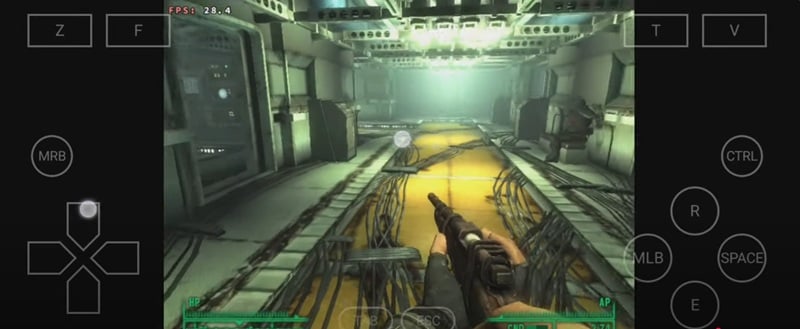
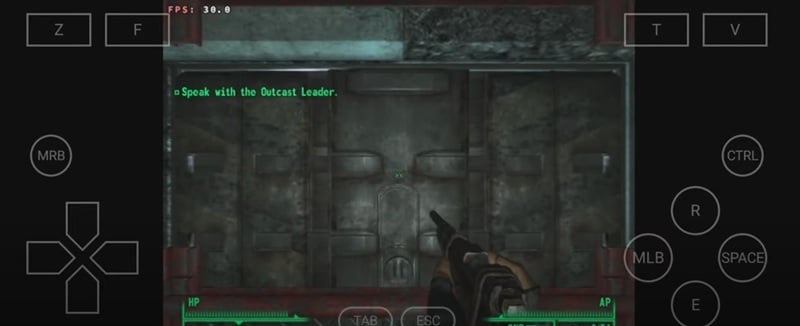
Winlator APK can be considered as an application that simulates the Windows operating system on Android. This is an open source application developed by brunodev85. After many years of development and editing, Winlator can now run some Windows operating system game applications right on your Android device. Although there are still many limitations and errors, Winlator will certainly bring more interesting experiences to users in the future.
Introduce about Winlator
In the past, many people wanted to own a device running Windows operating system with a compact size. However, these devices are often quite expensive and not very high performance. Therefore, many people with programming experience have tried to put Windows on their Android devices. However, most of them are just emulators for fun and very few applications are as complete as Winlator. So in today’s article, let’s learn about the Winlator application.
Conditions for using Winlator
Created by brunodev85, Winlator is considered one of the best Windows emulators that can play games. With the strong development of Android hardware and software, Winlator is increasingly improved. To be able to use Winlator stably, your device needs to satisfy the following requirements:
- Android version 7.0 or higher, you should use Android 10+ for the best experience.
- CPU must have ARM64 – Aarch64 structure, most Android devices today use this CPU structure.
- Minimum RAM 4GB, for smoother gaming experience, need from 6 to 8GB. Of course, the more RAM the better.
- At least 3GB of free memory to store more applications and games.
Technology used in Winlator
To be able to emulate the Windows environment on Android, Winlator has used many powerful technologies at the present time. Below are the technologies used in the latest version:
- Wine: This is the core technology that allows Windows applications and games to run on Android.
- Box86 & Box64 / FEXcore: Depending on the version, it can be Box86 & Box64 or FEXcore. They help compile x86/x64 machine codes to ARM64.
- DXVK and WineD3D: Convert Direct3D 9/10/11 technology to Vulkan API or OpenGL so that Android devices can process game graphics.
- RootFS Ubuntu: Configure necessary libraries such as .NET, mono… So that Windows games and applications can launch.
How to create a virtual Windows machine
Creating a new virtual machine in Winlator is quite simple. Just select the plus sign in the right corner of the screen and make the following choices:
- Name the virtual machine: Depends on your preference.
- Choose the screen resolution size such as 1280×720, 1600×900, 1920×1080. Note to choose the resolution that matches your device screen.
- Select Graphics Driver: Check what type of GPU your device is to choose the right driver.
- Select DX Wrapper: Simply choose the Direct3D version you want.
- Select Audio Driver.
- In addition, you can configure some more things such as Wine configuration, Win components… But I recommend you leave them at default values if you do not understand the nature of these customizations.
Some notes during the use of Winlator
Although it is relatively well updated, Winlator is still difficult to be compatible with all Android devices. Therefore, you need to pay attention to the following issues:
- Learn about your device: Not all devices can use Winlator smoothly. So use a device with mid-range configuration or higher.
- Performance and temperature: Although your device is eligible to use Winlator, be careful, many incompatible games and applications can cause the performance and temperature of the device to skyrocket.
- If the virtual machine has an error, delete it to avoid affecting many other things.
- Report errors to the developer if any and regularly update to new versions.
Games and applications you can experience
It is known that Winlator can currently run most Windows x86 or x86_64 applications and games. Of course, this depends largely on the configuration of the Android device you are using. Here is some information that we have learned:
- According to the developer Winlator can run games such as: Starbound, Assassin’s Creed: Revelations, Metal Gear Solid Ground Zeroes, Far Cry… Simply put, these games can run on mid-range PCs. However, some heavy games require high-configuration Android devices.
- On the GOG.com forum, some users have successfully run other games such as Stargazer, Stranger of Sword City Revisited.
- On some other forums, many users have also tested GTA 5, The Elder Scrolls IV: Oblivion… and received quite positive results.
Download Winlator APK for Android
Winlator, although not officially released on the Google Play store, is a reputable application in the simulation and emulation genre of Windows. With this application and a powerful Android device, you can completely experience many famous games immediately. Now, download Winlator APK here and try how powerful your device is.
Staff Editor
Reviewed and curated by our editorial team
Download this App
Get the latest version of this application for your Android device.